

The Honors Journal
Equipping Mentors
Making Disciples
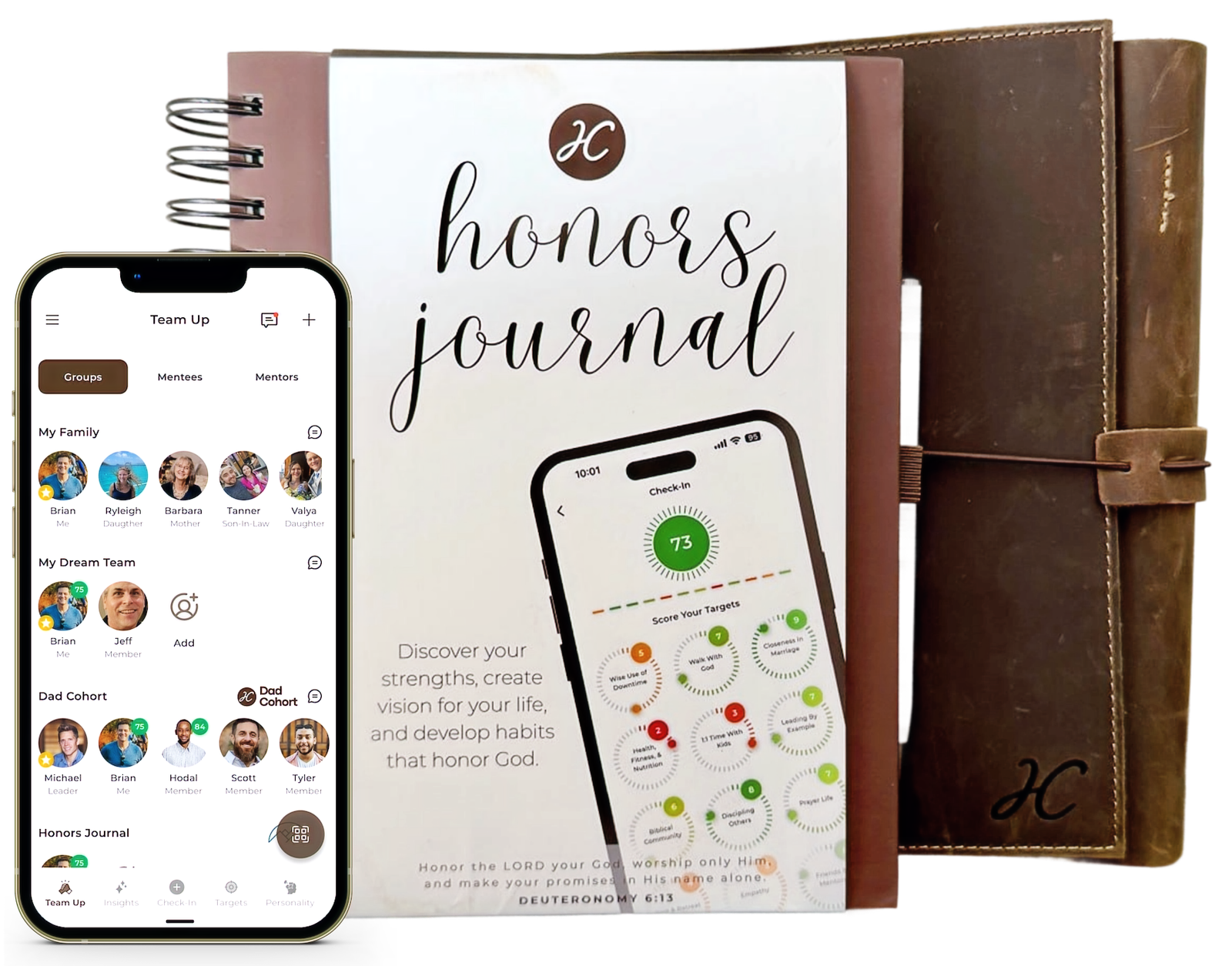
Clarity for your calling. Community for your journey.
The Honors Journal helps you discover your gifts, create vision, and develop godly habits; the Honors Co app deepens your insights, connection, and accountability.
“Our greatest fear should not be of failure but of succeeding at things in life that don’t really matter.” — Francis Chan
Where Do You Start?
Start with the
6-Week Challenge.
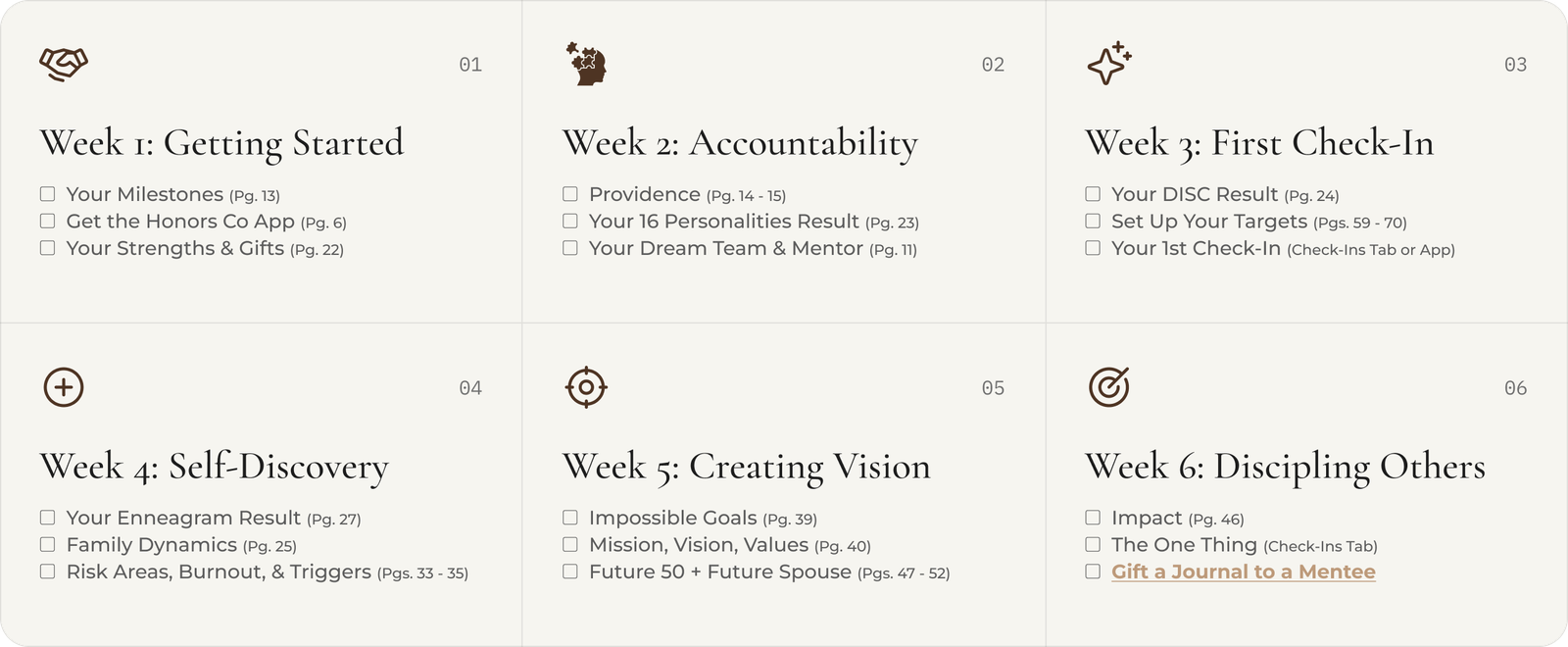
Learn to navigate the Honors Journal with our 6-Week Challenge. Join the next Honors Co hosted event, or go through it on your own with a mentor or small group.
Bring this to your church or group →

 Making Disciples Who Make Disciples
Spiritual Formation
Who are you becoming?
Your life isn’t an accident. No matter where you are in your faith journey, God has good plans for you. Your abilities, passions, and the people around you are there for a reason; the Honors Journal helps you see why.
 01
Discover Your S.H.A.P.E.
Use your spiritual gifts, heart, abilities, personality, and experiences to serve the people God’s placed in your life.
 02
Target Your Vision
Dream big, create godly direction for your life, and invite a community of faith-driven advisors on your journey.
 03
Accountability Check-Ins
Avoid mission drift with monthly check-ins around twelve hand-picked areas of your balance wheel.
Stop looking for your calling and start serving the people in front of you. — Brian Roland, Honors Co Founder
Mentorship
Accountability
requires community.

As Christians, we have a higher calling, to become more like Jesus.
The Bible calls us to examine ourselves, use our gifts, and train for godliness; that work accelerates in community.
Every page of the Honors Journal features a QR code to videos, podcast episodes, and conversations to help you reflect and grow, as you go.
 TARGETS
 HABITS
 CHECK-INS
The Honors Co App
Know Your S.H.A.P.E.
+ AI Insights.
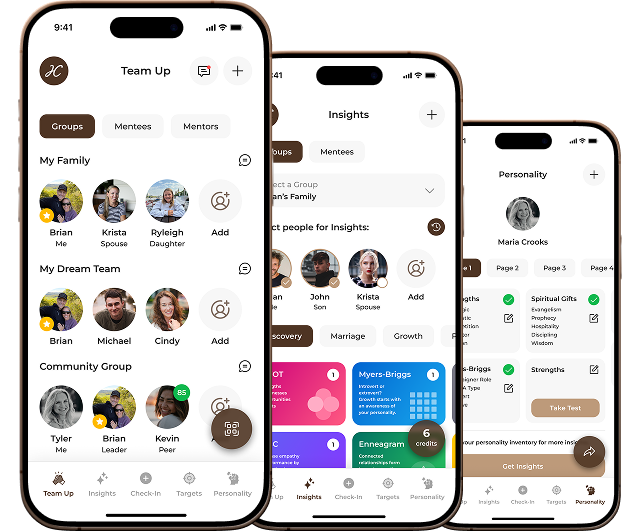
The Honors Journal guides your journey; the app deepens your discoveries, connecting you with your mentor or small group for real-time check-ins, personalized targets, and godly habits that actually stick. All for free on iOS & Android.

Scan to Download
Perfectly mapped to the Honors Journal
Assemble a Dream Team around your vision.
Build a mentor directory for your church or organization.
For Partners
Equip your people to multiply their impact.



Honors Co gives partners a simple, repeatable framework for discipleship; one that works for small groups, mentors, and peers. No curriculum to build. No training required. Just show up, and start the work of becoming like Jesus.
 01
Small Groups
Run the 6-Week Challenge together; group members work through the journal while holding one another accountable.
 02
Disciple-Making
Everyone who completes the 6-Week Challenge is commissioned to gift a journal and start mentoring someone in their life.
 03
Community Building
Foster a culture of discipleship with your own mentor directory, and use our S.H.A.P.E. tools to strengthen the families you serve.
“As iron sharpens iron, so one man sharpens another.” — Proverbs 27:17
Honors Co FAQs
Frequently Asked Questions
1.What is the Honors Co app?
Honors Co is a mentoring app for becoming more like Jesus. It brings together personality insights, target tracking with monthly check-ins, and real mentoring relationships, all grounded in the Bible. It works alongside the Honors Journal. If you're an organization looking to strengthen your disciple-making efforts, you can register your organization, build your own mentor network, feature your brand, customize targets, create small groups, and more. Download the Honors Co app at honors.co/app.
2.How'd Honors Co get started?
Honors Co started with a simple question: a new believer asked Brian to disciple him. What a wonderful question! Brian wanted to avoid the "what should we talk about" loop that burns out so many mentors, so he put together a framework he could sustain. He started by applying Biblical principles to a few of his favorite one-page plans from the business world, things like vision casting and personality insights, and the monthly check-in rhythms he learned from his local C12 group. He began using these to help his mentees discover their God-given S.H.A.P.E., create vision for their life, and develop habits that honor God. In just a few short years, the Honors Journal was born: a simple, repeatable, Bible-based tool he used to print at home before publishing in 2025. Today it's available in a variety of formats and works alongside the Honors Co app. The best part, it's designed to take you from mentee to mentor, fulfilling Jesus' calling for us to be disciples, making disciples.
3.Who is the app for? Do I need to be a Christian to use it?
The app is for everyone. You don't have to be a Christian to use it. You do need to be 13 or older to create an account.
4.What do I need to sign up?
You'll need an email address, a phone number, and your date of birth, plus basic profile info like your photo to personalize the experience for you and your connections. We verify both your email and your phone to keep the community clean. Your date of birth confirms you're over 13. And we help you get to know the people you're connected with by sharing your birthday, never your year, with them.
5.What is an invite code, and do I need one to join?
No, you don't need one to join. An invite code is how someone connects directly with you. When you sign up, you automatically get your own invite codes for your family group, friends group, dream team, and as a mentor. The only way to connect with you directly is by entering your specific invite code, either during sign-up or once they're logged into the app. As a bonus, anybody who joins for the first time using your invite code gets six free insights credits. And you get six additional insights credits free, as a thank you for inviting somebody new to join Honors Co.
6.Why do I get a mentor code? I'm not a mentor.
Jesus calls all of us to be his disciples who make disciples. That means thinking of yourself as the leader you are. If you're a Christian, you've accepted a leadership role. If you're a spouse or parent, you already have followers. We are all mentoring from Jesus, learning his ways, and we're called to mentor others in those same ways. Especially if you're not sure where to start with discipling others, this is what we've designed the Honors Co app and Honors Journal to do: equipping you to make disciples who make disciples.
7.What is the difference between a group invite code and a mentor code?
A group invite code brings someone into one of your groups, like your family group, friends group, dream team, or a custom group you create. A mentor code connects someone with you one-on-one, as your mentee. They work the same way: the other person enters your code during sign-up or once they're logged into the app.
8.What is the Inbox for?
The Inbox holds system messages from the app, like group and mentor request approvals, join requests, and other notifications. You can't send messages from it; it's the app talking to you, not a chat with other users.
9.How do a mentor and mentee use the journal and app together?
It starts with better, more focused one-on-ones. Too many mentoring relationships stall on "so, what should we talk about?" or fizzle halfway through a book study. Honors Co solves that problem with a monthly check-in rhythm around 12 target areas in life. The app lets you personalize those targets around the mentee's unique needs and personality insights. The journal's check-ins tab offers 12 preset targets to score, so you can engage in this rhythm of reflection on paper. We encourage mentors to get together with their mentees monthly, asking the mentee to complete a check-in prior to the meeting. This gives you both real context for what's most pressing to discuss. It gives you an opportunity to celebrate the highs, and lean into the lows. If there's still time in your monthly meeting, then the Honors Journal gives you a space to further the conversation, writing down your takeaways, capturing your insights, and working through the next challenge.
10.What are the 12 target areas?
Every user gets 12 preset targets to score, based on what we've found works well across 12 key areas of life. The 12 default targets are: Walk With God, Sexual Purity, Closeness in Marriage, Wise Use of Downtime, Health, Fitness, and Nutrition, Discipling Others, Personal Finances, Tithe and Generosity, Prayer Life, 1:1 Time With Kids, Biblical Community, and Rest and Retreat. Your starting targets are based on your life stage. If you're married, you'll see Closeness in Marriage. If you have kids, you'll see 1:1 Time With Kids.
11.What is a check-in and how often do I do one?
A check-in is a monthly self-assessment that takes an honest look at how things are going. You'll use the check-in feature in the app or the journal to score yourself 1 to 10 across twelve target areas, for a total out of 120. It's built on the life-balance wheel that professional coaches use, so imbalances are easy to see. Winning at work while losing at home isn't good stewardship. These check-ins keep you on track, and when you share your results with a mentor or small group, real growth and accountability begins.
12.Can any personality assessment be added to the app?
Yes! The app lets you load in your results from popular assessments you've already taken, like 16Personalities, DISC, Enneagram, and more. Once loaded, our insights engine creates biblically grounded and discipleship focused reports to help you grow and become more like Jesus. If you don't see the assessment you're looking for, then email us at info@honorsco.com and we'll get it added for you.
13.How accurate are the personality insights?
We think they're pretty accurate. The assessments are backed by decades of behavioral research, and studies show AI interprets personality about as well as trained human judges. We apply biblical wisdom to those findings. But the reports are only as good as the results you load in, and no assessment captures all of who you are. That's why our AI Insights are meant for personal reflection, growth, and entertainment, not professional advice. Your God-given shape is as unique as a fingerprint, and these insights simply help you recognize ways to grow as you get to know yourself better.
14.Can my personality type change over time?
Yes, and that's kind of the point. Your personality's shape is just a starting point, not your identity, and it will change over time through life experience, intentional growth, and the transforming work of God. That's why you can update your results in the app whenever you retake an assessment. Your insights will always reflect the current you, not a past version.
15.Who can see my personality results?
Your results are only shared with the people you're connected with in the app. Your mentor can see the results you've loaded and run insights reports to help you grow. People you're connected with can do the same. This helps everyone get to know each other better and build stronger relationships. Only people connected with you can view your profile. If you no longer want someone to see it, you can remove the connection at any time or leave a group they're in.
16.What are Personality Maps?
Personality maps show your family or group dynamics at a glance. Each person is plotted to represent differing points of view on common personality preferences, like whether they recharge alone or with people, or whether they prefer to have a plan or like to keep their options open. When we learn to appreciate each other's God-given differences as individual strengths, we begin to build empathy for one another, which leads to reduced friction and better relational outcomes.
17.What do the percentages and rows mean?
Each map represents a personality area, like Energy or Reasoning, on a 0 to 100 scale. Your percentage shows where you land. Each person's percentage is displayed within the green circle on their profile photo. The rows group similar scores together. When a row is full, you can swipe right to left within the row to see more people. For instance, on the Energy map, the top rows lean toward needing connection and the bottom rows toward needing solitude. Same idea on Reasoning, with prioritizing fairness on one end and prioritizing people on the other. At a glance, you can see who's like you, and who's not, and where everyone else falls in between.
18.What do the VS labels mean?
Each map represents a single spectrum of personality with two opposite poles. This is called a dichotomy: a division of one whole into two contrasting parts. The idea goes back to Carl Jung, the Swiss psychologist who first mapped these opposites in his 1921 book Psychological Types. Jung proposed that people differ along fundamental pairs, like extraversion versus introversion, or thinking versus feeling. Later researchers, including Hans Eysenck and the psychologists behind the Big Five model, refined Jung's categories into continuous spectrums, showing that personality differences come in degrees along a continuum, not on/off types. That's why each map has two labeled ends: they name the opposite directions of the same underlying tendency. Most people land somewhere in the middle, and neither end is better. Each position carries its own strengths and tradeoffs depending on the situation. On the Energy map, "Needs Connection" describes people wired to recharge with others, while "Needs Solitude" describes people who recharge alone. The same idea runs across Reasoning (Prioritizes Fairness vs Prioritizes People), Structure (Enjoys a Plan vs Keeps Options Open), Focus (Facts-First vs Possibilities-First), and Confidence (Trusts Themselves vs Needs Reassurance). Your position reflects your usual tendency, not a script for every moment. High-pressure situations tend to pull everyone toward the same behavior; relaxed ones let your natural pattern show.
19.What if someone hasn't entered their personality information? Will they still show up on the map?
No. Each map is built on a specific assessment, so we can only plot people who have filled out the personality page for that assessment. If someone hasn't entered their results yet, they won't appear on the map. Once they do, they'll show up like everyone else.
20.Do Maps cost credits?
Personality Maps don't cost credits, and they're free for everyone to explore. The one exception is the Teams tab, which requires a Pro subscription: your org admin sets the organization type to Employer and creates the teams group.
21.What is an Insights report?
We've pre-populated your account with over 50 insights reports to help you discover more about yourself, and others, in a focused way. Each insights report is personalized based on the selected individuals' personality results. Our insights engine is built with a biblically grounded model, utilizing AI to provide discipleship focused insights that help you grow and become more like Jesus. Each report maps back to specific pages in the Honors Journal, giving you clear takeaways to work through. They're meant for personal reflection, growth, and entertainment, not professional advice.
22.How does the AI generate reports?
When you run a report, the app sends first names, basic profile details, and personality results for the people you've selected to our AI, nothing that identifies you. The AI works under a strict set of grounding rules: Scripture is the absolute authority, followed by Honors Co frameworks, conservative Christian theology, and psychology, which is used only to describe wiring, never to define identity. It interprets the personality patterns through that lens and generates a personalized report. Every report maps back to specific pages in the Honors Journal, ends with a probing question or challenge, and includes a quote to reflect on and help you grow.
23.What does a report cost?
Reports cost one credit each. Every new user starts with six free credits. When someone joins using your invite code, you both get six more free. Additional credit packs are available for purchase, and upgrading your account unlocks unlimited reports.
24.Can I run a report about someone else? What are the rules?
Yes. You can run a report about anyone connected to you in the app: a mentee, or someone in one of your groups. Reports cover one person, or compare two people side by side.
25.What data is sent for Insights reports?
First names, basic profile info like gender, marital status, and parental status, plus personality results for the people you've selected. Nothing that identifies you: no last names, no contact info.
26.What are the report categories?
Assessments, Awareness, Discovery, Interpersonal, Leadership, Marriage, and Parenting. Conflict-related topics live under Interpersonal or Marriage.
27.How does target scoring work (1-10, habits average)?
You score each target area 1 to 10, and your twelve scores add up to a total out of 120. If you want more precision, you can score the key habits underneath a target, and their average becomes the area's score. Key habits are your private inputs, only you can see them.
28.What are locked targets? What do the lock icons mean?
A locked target is one your organization admin or group leader has required, so it appears in every check-in and you can't swap it out. A gold lock with a solid outline means your organization admin locked it; a gold lock without the outline means your group leader locked it. Anything not locked, you can personalize.
29.Can I change my targets?
Yes, with the exception of targets locked by your organization admin or group leader. You can update your targets from the check-in page by clicking the targets icon.
30.Why would a group leader or organization admin lock targets?
Locking targets builds a shared culture and real accountability. When everyone in the group scores the same core areas, your check-in conversations go deeper, because you're looking at honest numbers on the things that matter most to that community. Research on high-performing teams backs this up: shared standards are what turn individual effort into a culture, and they keep everyone pursuing the same things together.
31.Why do I have to score 12 targets?
By focusing on 12 areas you cover the essentials while pushing yourself to grow. Our culture worships hyperfocus, performance, and acquisition. None of these fit into a kingdom mindset. As Christians we have a higher calling: stewarding our time, talents, and resources for God's glory. That takes intentional leadership across every area of life, not just the ones the world notices. Research keeps confirming the cost of getting this wrong: poor health, strained relationships, and burnout crushing those who miss this truth. At Honors Co, we believe it takes twelve areas to do that well, and we prepopulate each account with the ones we think matter most. Each month, you score them all and get a score out of 120, so you can watch your progress as you grow.
32.Who sees my check-in scores?
Your check-ins are specific to a group or mentor, and the scores you save are visible to them. Your mentor(s) and Dream Team see the check-ins you save for them. If you're in another type of group, your fellow members can see those scores too, but only if your group leader turned on score sharing. Your family and friends groups cannot see your check-in history.
33.Can I set up and track different targets for different mentors and groups I'm in?
Yes. From the check-ins page of the app, select the group or mentor you are completing the check-in for, and set the targets you want to track with them. Each group or mentor can have its own set of targets. The only exception is targets locked by your organization admin or group leader, which you can't change.
34.What are Key Habits?
Key Habits are the small, repeatable actions behind your targets, the inputs that drive the outcomes you want. As James Clear writes in Atomic Habits, focus on systems instead of goals: your targets are the goals, and your Key Habits are the system that gets you there. You set them yourself and score them in your check-ins, and their average becomes your target's score. Key Habits aren't required to complete a check-in, but they help you sharpen your check-in scores. Key Habits require a Level Up or Pro subscription, and only you can see them.
35.Who can see my Key Habits?
Only you. Key Habits are set exclusively by you, and organization admins, group leaders, and mentors cannot see them.
36.How do I find a mentor?
Open the Find a Mentor page and search by organization. Mentors approved by their organization's admin are listed there. Tap the plus icon next to a mentor's name to request them, or use the phone or email icon to contact them first.
37.What is the difference between Local and Nationwide mentors?
Local mentors are near you and meet in person. Nationwide mentors offer virtual mentoring, such as over video calls, no matter where you are.
38.How do I become a mentor?
Open the Become a Mentor page and tap the plus icon next to an organization to request a mentor role; the organization's admin reviews and approves it. You can also start right away under the Honors Co organization by sharing your mentor invite code or QR code, which you can find from the Send Invites page or the Mentees tab of the Team Up page.
39.How many mentees can I have?
It depends on your plan: one mentee on the free plan, up to three with Level Up, and unlimited with Pro.
40.Are mentors vetted by Honors Co?
No. Honors Co connects mentors and mentees but does not qualify users, perform background checks, verify credentials, or endorse participants. Mentors participating in another organization's mentor network are subject to that organization's own standards.
41.How do mentor and mentee communicate in the app?
There's no in-app messaging. Mentors see their mentees' check-in scores, check-in history, and personality results in the app, and the two connect outside of it, by phone, video, or in person.
42.What is a Dream Team?
Your Dream Team is a specialized, one-way accountability group: your personal board of directors. You hand-pick two or three trusted advisors who see your check-in scores and hold you to a godly standard. In your Dream Team meetings, you're the only one sharing scores and struggles. They're there to spot your blind spots and spur you on, not to take turns sharing their own. It's deeper than a peer group. A small group is mutual, everyone shares. Your Dream Team goes deep on one person: you. Jesus modeled this with his inner circle of Peter, James, and John, and Hebrews 10 tells us to spur one another on toward love and good deeds. Your Dream Team is already set up in the app on the Team Up page. Just tap invite and send the link to the people you want on it.
43.How do I stop accepting new mentee requests?
From the My Profile page, open the Roles tab and flip your mentoring availability to Closed. You can set it separately for each organization you mentor with.
44.How do I end a mentoring relationship?
From the Mentors tab of the Team Up page, tap Cancel Mentorship under the mentor's name.
45.How do I start or join a group?
To join a group, enter the group code, search the Find & Join Groups page, or tap an invite link. To start your own, select an organization from the Start a Group page, give it a name and complete the setup form. You'll get a unique invite code to share.
46.What is an organization in the app?
Honors Co. is the default organization for all users. Under the Honors Co brand you can mentor others, start a group, and connect with your friends, family, and Dream Team. If an outside organization like your church wants to build its own mentor network, run small groups for accountability, and create custom check-ins, it can be added as an organization within the app. Organizations get special branding within the app, and organization level upgrades may be required for certain features. All outside organizations require prior approval from an Honors Co admin.
47.How does my church register as an organization?
First, create an Honors Co account for yourself. Then tap the menu icon in the upper left, and tap the plus icon to open the More Features tab. Select "Add Your Organization" and fill out the form. Once you submit, one of our team members will review it and get back to you.
48.What is the difference between a group leader and an organization admin?
A group leader runs a single group: managing its members and settings, and optionally locking targets for that group. An organization admin runs the whole organization: approving new group and mentor requests, setting up and locking its initial targets, and holding responsibility for the mentor network under it. The person who registers the organization becomes its admin.
49.What's the difference between public and private groups?
Public groups are listed on the Find and Join Groups page, where anyone can find and join them. Only the group leader is shown there; other members stay private. Private groups are invite-only: you join with a group invite code or QR code from the leader.
50.Can I make a men-only or women-only group?
Yes. When you start a group, you can set it as men-only or women-only, and it's discoverable on the Find and Join Groups page based on gender.
51.How do I make someone else a group leader?
The gold star icon next to a member's name shows who the group leaders are. To add another, press and hold on any group member to reveal group settings, then click the grayed-out star icon next to their name. This does not apply to your Family, Friends, or Dream Team groups, where roles are fixed.
52.How do I remove a group member?
Press and hold on the member to reveal group settings, then tap the red minus icon to remove them.
53.What are Insights credits and how do I get them?
Insights credits pay for AI Insights reports: one credit per report. You start with 6 free credits. You can earn 6 more each time someone joins with your group code, receive gifted credits from a mentor, or buy credit packs (6 for $5.99, 15 for $15.99). Level Up and Pro members get unlimited Insights and never need credits.
54.What do the subscription tiers cost and include?
Most of the features inside the Honors Co app are free. Every user gets six free Insights credits just for joining, can mentor one mentee, and can start and lead one group of their own, on top of the three auto-created starter groups (Family, Friends, and Dream Team). Upgrade to Level Up for $6.99 a month or $49.99 a year to mentor up to 3 mentees, lead up to 3 groups, and unlock unlimited Insights reports, plus Key Habits for your Targets, key date reminders, and inspirational quotes you can add or hide. Upgrade to Pro for $29.99 a month or $144.99 a year for everything in Level Up, plus lead unlimited groups, unlimited mentees, and an Honors Teams account.
55.Can I gift credits to someone?
Yes. You can gift Insights credits to anyone you're connected to through the app, straight from your current balance. Want to give more than you have? Buy more credits first, then gift them.
56.How does the group-code referral reward work?
Any time someone you invite joins Honors Co for the first time, you both get 6 additional Insights credits for free.
57.Do credits expire?
No. Your credits won't expire.
58.What data does Honors Co collect about me?
We only ask for the information we need to personalize your Honors Co app experience. When you sign up, that includes your name, email and phone, and date of birth (to verify you're over 13). Inside the app we save your personality results, check-in scores, and targets, and we ask a few questions about your life to personalize the experience for you. Those questions are always optional, so you can leave any of them blank. Your information is never sold.
59.Is my data sold or shared?
Your data is never sold. It's shared only with the service providers who help us operate the app, and only to the extent needed to deliver what you've asked for.
60.How do I report or block someone?
You can remove someone from a group you manage, or leave a group at any time. To report a user, email info@honorsco.com.
61.Can I delete my account and data?
Yes. You can delete your account at any time from the My Profile page in the app, or by emailing info@honorsco.com.
62.How does the app handle my kids' information?
If your child doesn't need their own account, you can add them under your sign-in and load their personality info yourself. We collect only their first name, last name, birthday, and relationship to you, and they get no account of their own. Children under 13 can't create accounts; if we discover one, it's deleted.
63.What is Today's One Thing?
Today's One Thing is a daily feature in the app. It offers one short teaching tied to the Honors Journal, one small action step, and a check box to track your progress. It helps you get 1% better every day as you learn to honor God in all your ways.
64.What is the Featuring card?
The Featuring card is found on the Today screen of the Honors Co app, and gives you one tip a day about someone you're connected to, helping you appreciate their God-given shape, grow empathy for them, and learn how to be a better leader for them.
65.Do I need the Honors Journal to use the app?
No. The Honors Co app is designed to stand on its own: it mirrors the journal as your digital companion, helping you build community, create accountability, and deepen your insights.
66.How do the app and the journal work together?
The Honors Co app and the Honors Journal each stand fully on their own, and when used together, they create an even more powerful experience. The app helps journal users take their insights from the Discovery section even further, personalize their targets and key habits, and share real-time check-in results with their mentors and groups. The journal helps app users go deeper on paper, teaching them how to examine themselves, use their gifts, and test and approve God's will. Together, they provide a powerful framework for mentorship and personal growth, as we pursue Jesus's call to be disciples, making disciples.
67.What is a discipleship track?
Your discipleship track tells the app whether to deliver the men's or women's experience, with content shaped for each. You select it when you sign up.
68.How do I log in? Do I need a password?
No password needed. You log in with a two-factor authentication code, sent to your mobile phone for users in the United States, or to your email address for international users.
69.What are key date reminders and how do I set one?
Key date reminders make sure you never miss the dates that matter in your relationships: birthdays, anniversaries, special traditions, and recurring events. You set the date on the Reminders page, and the app nudges you by text or email. They require a Level Up or Pro subscription.
70.What is Honors Teams?
Honors Teams is the workplace version of the app, for teams interested in getting to know each other and communicating better. It's included with a Pro subscription, and it's never for hiring or firing decisions.
71.Where can I find training for the journal and app?
Training is available right in the app. You can also scan the QR code printed on any journal page, tap it with NFC, or visit honorsco.com/training.
72.What is the 6-Week Challenge?
The 6-Week Challenge walks you through the full Honors Journal in six weeks. Each week you watch a short video, do three things, and discuss them with your mentor or group. By the end, you'll have navigated the entire journal and can walk someone else through it. Sign up at honorsco.com/challenge.
No questions match your search.